Status, rechecks, and checking out
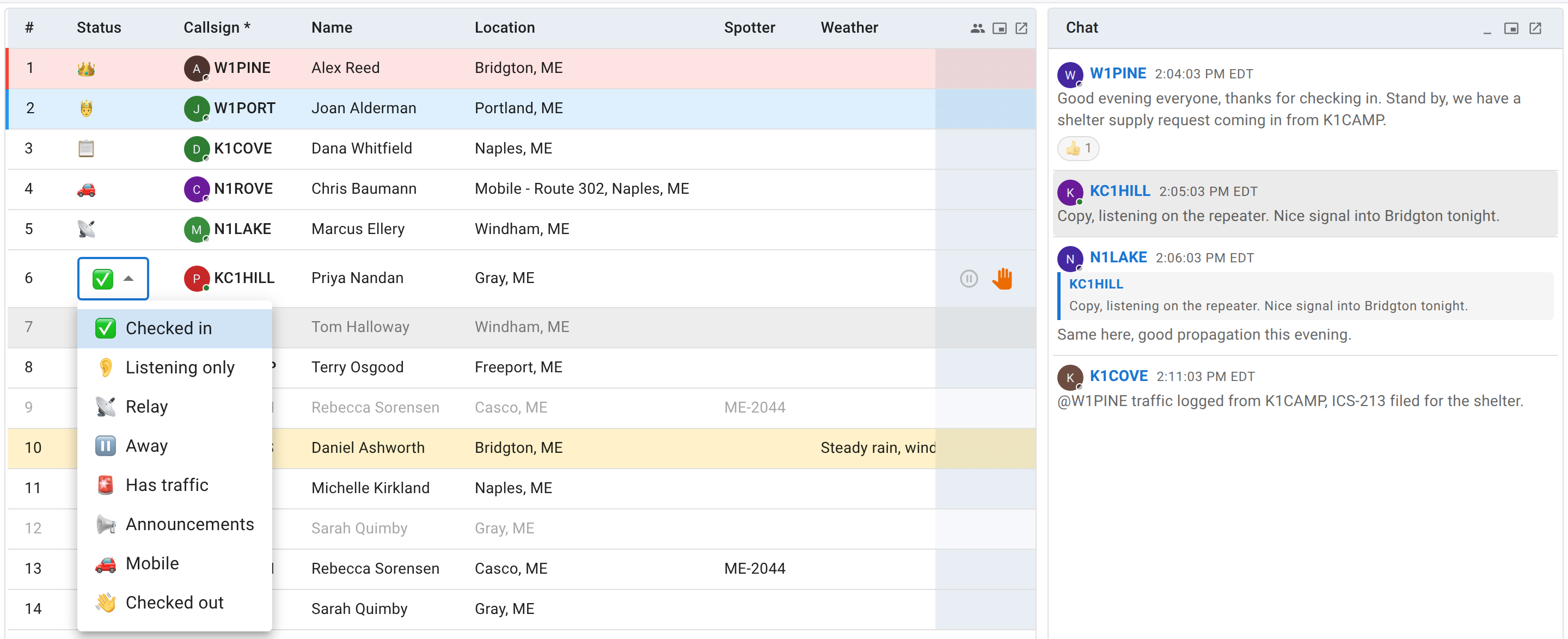
The check-in list has a legend across the top of the table. It looks like one flat row of icons, but it’s actually describing three different kinds of thing at once, and most of the confusion about “statuses” in ECTLogger comes from not separating them:
- Station statuses — what you’re doing right now, and the only thing you as a participant set on your own row.
- Role badges — a standing job on the net (NCS, Logger), which replaces your status icon while you’re in the default checked-in state.
- The recheck marker — a one-time flag on a specific check-in row, not a status at all.
This page is about the first and third. Roles belong to whoever is running the net; see the net control path if that’s you.
The eight statuses
| Icon shown | Label | Tooltip | Set it when |
|---|---|---|---|
| check mark | Checked in | Checked in and available | The default. You’re there and reachable. |
| ear | Listening only | Monitoring only, not transmitting | You’re following along but not planning to key up. |
| antenna | Relay | Relay station - can relay stations NCS cannot hear | You’re passing traffic for a station NCS can’t hear directly. |
| pause | Away | Temporarily away, will return | Stepping away briefly — see below, there’s a dedicated button for this. |
| siren | Has traffic | Has traffic or emergency to report | You have something for NCS, formal or not. |
| megaphone | Announcements | Has announcements to share | You have something to say to the net, not just to NCS. |
| car | Mobile | Mobile - may only be available briefly | You’re operating from a vehicle and might drop off suddenly. |
| waving hand | Checked out | Checked out of net | You’re done for this net. |
That’s the complete list. StationStatus has exactly these eight values and no others. If you’ve seen an older guide mention a status called “Available,” that was never a real one; every status above except “Checked in” and “Checked out” is something you’d actively choose because it’s true of you right now.
You can change your own status at any time while you’re checked in, straight from the check-in list, with no NCS or Logger involved, since it’s your own row. The dropdown there is the only place all eight are offered.
The net’s toolbar, across the top of the page, carries one-click versions of the ones you’ll actually want mid-net, so you don’t have to find your row at all:
- Step away (a pause icon) puts you in Away, for a bathroom break or a quick errand without checking all the way out. While you’re away the same button reads Return, and clicking it puts you back to Checked in.
- Just listening (a headphones icon) puts you in Listening only, for when you’re monitoring rather than transmitting. It toggles back the same way.
- Check out (a red exit icon) sets Checked out, exactly as the dropdown does.
- Raise hand (a hand icon, and not a status at all) flags that you want to say something without changing your status. That is useful on a net where interrupting isn’t the norm and you’d rather NCS notice a raised hand than a random status change. It reads Lower hand once your hand is up, and it isn’t offered to the acting NCS, who runs the queue rather than joining it.

On a narrow screen those buttons drop their labels to save room, and then move into the More menu at the end of the toolbar if there still isn’t space. They do the same thing from there.
The other four statuses (Relay, Has traffic, Announcements, and Mobile) have no button of their own. The dropdown on your row is where you set those.
The role badges you’ll see but can’t set
Two icons in the legend describe a role, not a status, and they only ever show up on someone else’s row (or your own, if you hold the role):
- NCS (a crown icon) — Net Control Station, currently running the net.
- 2nd NCS (a crown-and-scepter icon) — this is the one worth getting right. It is not a separate role you can be assigned. Some nets legitimately run with more than one active NCS at once. A multi-desk SKYWARN activation is the clearest example, where several people each run their own frequency as NCS at the same time. When that happens, the list needs to show which NCS was there first without implying the others are impostors, so it marks every NCS after the first-assigned one with this second icon instead of a second crown. If you ever see “2nd NCS” and go looking for it in a list of roles you can be given, you won’t find it, because it isn’t one.
- Logger (a clipboard icon) — assists NCS with logging. Also a role, also not something you set via a status dropdown.
These badges only appear while a station is in the plain Checked in state. If an NCS or Logger sets an actual status, say they go Mobile or step Away, that status icon takes over from the badge for as long as it applies, because what they’re doing right now is more useful information than the fact that they hold a role.
The recheck marker isn’t a status either
If you check in, then later check in again under the same callsign, ECTLogger doesn’t silently update your existing row. It adds a brand new row, timestamped when the recheck happened, and links it back to your first check-in. That matters for the same reason a net log matters at all: NCS wants to know when a station rechecked, on what frequency, and how many times, not just that they’re currently present.
By default the check-in list shows every one of those rows, and marks the newest one for a given callsign with a recheck (circular arrows) icon instead of the usual check mark, tooltip “Re-checked into the net.” That’s what you’re seeing when the legend shows a “Recheck” entry: a flag on one particular row, not an eighth status alongside the eight above. If the list is getting long with a station’s earlier rows all still visible, there’s a small icon in the corner of the table’s header that toggles Hide duplicate rows (show latest per station). Turning it on collapses the view down to just each callsign’s most recent row; turning it back off (“Show all rows, including re-checks”) brings the full history back. Nothing is deleted either way; it’s purely a display filter.

Checking out
Setting your status to Checked out tells NCS you’re done, and it’s what makes the net’s log accurate: participation counts, the ICS-309 form if the net generates one, and your own statistics all read off the check-in list as it stood when the net closed. A station that’s actually gone but still shows Checked in makes the net look busier than it is and can leave NCS waiting on someone who left an hour ago.
You don’t have to check out before a net closes, since closing the net doesn’t erase anyone’s status, but if you know you’re leaving, saying so costs one click and helps whoever is running the net know who’s actually still there.