Speed entry
When check-ins are coming in faster than you can click through a form for each one, this is the tool for it. Long-time operators tend to call this “speed entry,” but the button on the screen reads Bulk add, with the tooltip “Bulk add multiple check-ins”. That’s the label to look for.

Bulk add is visible to NCS and Logger once the net is in lobby or active and has at least one check-in already on it. Relay does not get this button and logs check-ins the ordinary way instead.
Opening it
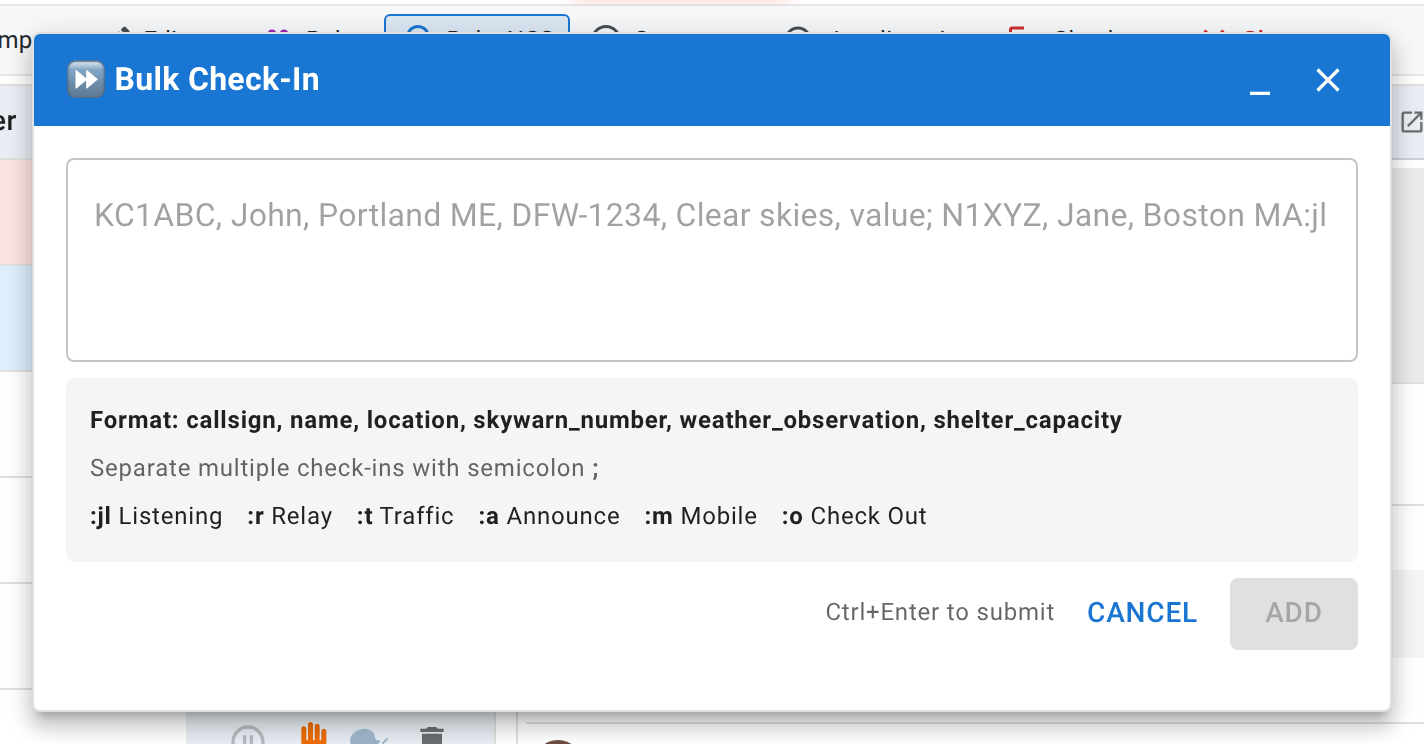
Click Bulk add. A window opens with a single multi-line text box and, underneath it, a “Format:” line showing exactly which fields this specific net expects and in what order, the semicolon separator, and the status shortcuts. That line changes net to net depending on which check-in fields the net’s manager turned on, so read it rather than assuming it matches the last net you ran.
It’s a floating window rather than a dialog: drag it by its title bar to somewhere it isn’t covering the check-in list, and it stays where you put it.
Using it during a net
Type each check-in’s fields separated by commas, and separate check-ins from each other with a semicolon: one caller, comma-separated fields, next caller after a semicolon. A single check-in on its own line works exactly the same way; you don’t need more than one to use this box. The exact field order, the status shortcuts (:jl for Listening, :r for Relay, and so on), and a full worked example are all in Speed entry syntax. This page is about the workflow; that one is the grammar.
A few things worth knowing while you’re in the middle of it:
- Ctrl+Enter submits without reaching for the mouse.
- Each entry in the line is submitted on its own, so one bad callsign doesn’t hold up the rest of the batch. The result tells you how many succeeded, how many failed, and what went wrong with the failures.
- Callsigns are uppercased and format-checked automatically.
What everyone else sees while you’re typing
While the box is open, every other viewer of the net, participants included, sees a brief notice below the check-in table warning that check-ins may arrive in bursts. That’s there so a wall of new rows appearing at once reads as normal activity, not as something broken. It clears itself a few seconds after you close the box or stop typing.
Cleaning up afterward
Speed entry doesn’t do anything a normal check-in doesn’t; a batch-added row is a completely ordinary check-in afterward. If you mistype a callsign in the rush, fix it the same way you’d fix any other row: click it to edit it in place, covered in Logging check-ins. If you accidentally add a duplicate, delete the extra row rather than leaving it; a genuine recheck (someone actually calling in again) is different from a typo that happened to repeat a callsign, and only one of those should stay on the list.
Next
Logging check-ins covers the single-station path this exists alongside, and Frequencies and multiple net controls covers a net running more than one frequency at once.