Roles and stepping away
Net Control, Logger, and Relay are all per-net roles, held for one net and gone once it closes. This page covers taking one, handing it to someone else, stepping down, and what happens to the net while nobody’s actively holding NCS.
Taking a role by checking yourself in
If you’re on the schedule’s net staff or its NCS rotation for the schedule this net came from, you don’t need anyone to hand you anything: checking yourself in offers a Check In as NCS or Check In as Logger choice right alongside the plain participant option, and it works even on a week you weren’t specifically scheduled. This is deliberately opt-in. Checking in normally never silently makes you NCS or Logger, and a check-in someone else enters on your behalf (over the air, by voice) never grants a role either, no matter who you are.
This doesn’t depend on whether the net already has an active NCS. A large exercise with several eligible staff each claiming NCS for their own desk within minutes of each other is the normal pattern, not something the system tries to prevent; Frequencies and multiple net controls shows what that looks like on screen. The full eligibility rules (who counts as net staff, what a rotation member can do, and the difference between that and a schedule’s co-manager tier) are in Roles and permissions; this page assumes you already know whether you’re eligible and covers what happens once you act on it.
If you aren’t on the net staff or rotation of the net’s schedule, self-grant isn’t available, so someone already running the net has to assign you the role directly, covered next.
Assigning a role to someone else
Open Roles on the toolbar (see The net control desk). This opens Manage Net Control Staff: pick a user, pick NCS, Logger, or Relay Station, and click Assign Role. Every current assignment is listed below with its own remove control.
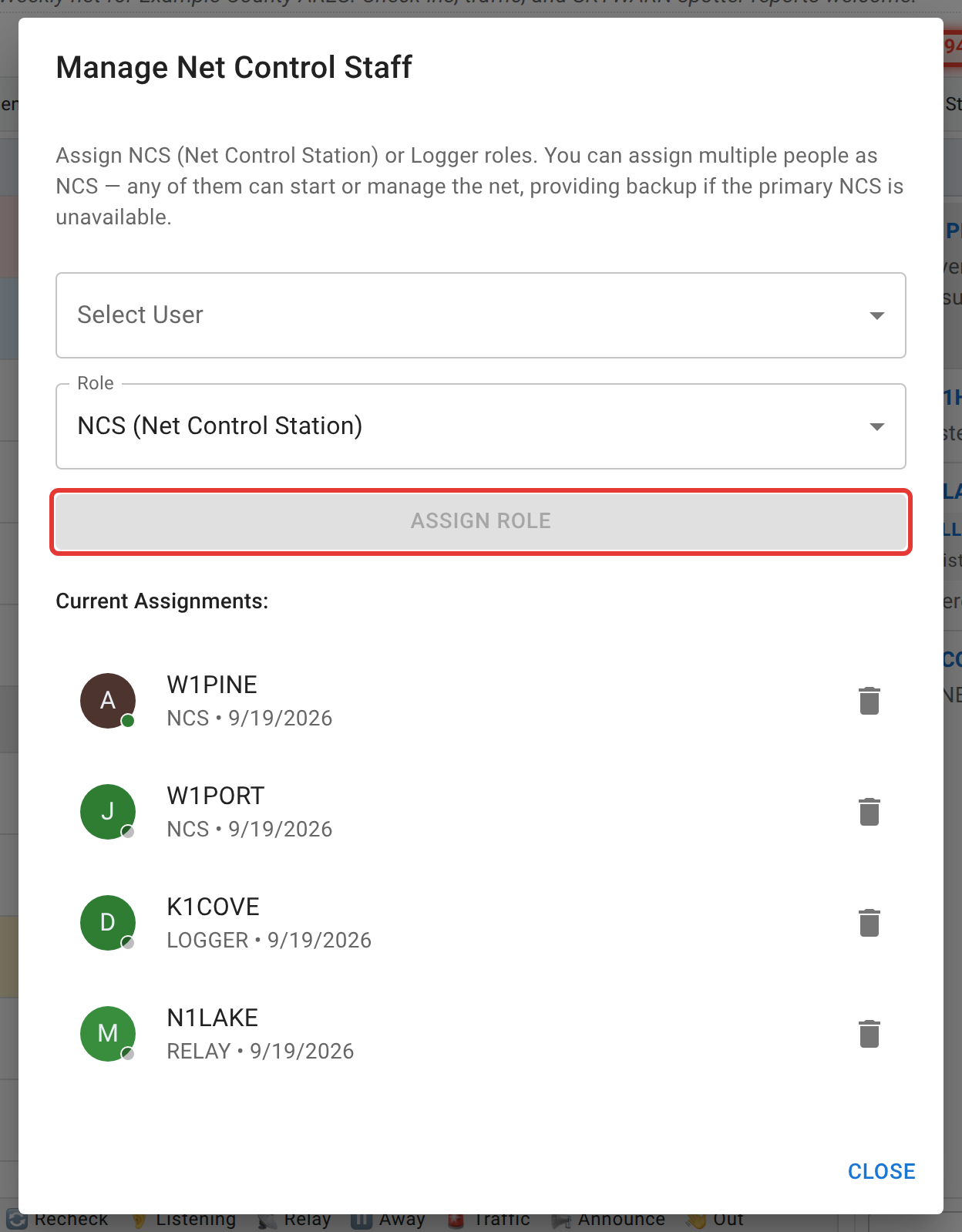
This dialog is available to the net’s manager, an admin, or (on a templated net) staff who already hold an active NCS or Logger role on this specific occurrence themselves. Being on the staff list or rotation isn’t enough by itself if you don’t also currently hold one of those two roles here, and since 2026-09-19 the Roles button doesn’t appear at all unless you meet that bar. Before then it was shown to any net staff, and every action inside it was then refused. If a net has no NCS assigned at all, the net’s manager or an admin can also use Claim NCS, a recovery button meant for an orphaned net rather than everyday handoffs.
Stepping down, and stepping away
These are two different things, and it matters which one you mean.
Stepping down (the Role: NCS / Role: Standard toggle on the toolbar) toggles whether your existing NCS role is currently active. Step down and you genuinely lose NCS access to this net, because the backend enforces the same active flag the screen shows, so this isn’t just a display change. You keep the role itself and can step back up to it later; you just aren’t acting as NCS in the meantime. If you’re the only active NCS on a net that’s currently active, this toggle is blocked outright; assign or wait for another NCS first.
Stepping away (the Step away button) is a status change on your own check-in. It marks you Away, the same as anyone else’s Away status. Unlike stepping down, this one is allowed even if you’re the only active NCS, but if you are, it asks you to confirm first: “No one else is currently acting as NCS on this net. Stepping away leaves it without anyone actively running it until you return or hand the NCS role to someone else.” Confirm and it goes ahead anyway; this is a warning, not a lock.
The paused-net banner
If none of the net’s currently-active NCS are actually present (checked in, and not Away or Checked out), the net is considered paused. Every viewer sees a blue border around the whole browser window and a banner reading “Net Control has stepped away — this net has been paused until they return.”
A couple of things worth knowing about this:
- It only happens when the net has an assigned NCS who isn’t currently present. A net running with no NCS assigned at all isn’t paused. That’s the normal, by-design “open net, nobody’s formally claimed control yet” state, not an error.
- It clears itself the moment any active NCS becomes present again, and there’s nothing to dismiss or reset by hand.
- Pausing doesn’t stop the clock on anything except the net’s own tracked paused time. Check-ins, chat, and everything else keep working exactly as before. It’s a visibility signal for anyone watching, not a lockout.
Next
Chat moderation and handling traffic cover the other two responsibilities that come with holding NCS or Logger.