Chat moderation
Chat has two different mute controls behind the same icon, and they do genuinely different things: one is a personal filter anybody can use, the other is a real moderation action reserved for staff. Getting the difference right matters because of how far each one reaches — one changes your own screen, the other changes everybody’s. Neither one tells the muted station anything.
Muting a station for yourself
Anyone can do this, on any message that isn’t their own. Hover the message and click the mute icon that appears in its hover toolbar.

A plain click hides that station’s messages from your own view of this net’s chat, for the rest of the net. It’s entirely client-side filtering on your end — the messages still arrive, they’re just not shown to you. Nobody else’s view changes, the muted station is never told, and the net’s exported chat log is completely unaffected.
Muting a station for everyone
This is a staff action: the net’s active NCS and Logger, plus the net’s manager and any admin. Shift-click the same mute icon instead of a plain click, and that station’s chat messages stop reaching every other viewer’s browser for the rest of this net — not just yours.
A few things worth knowing about how far this actually reaches:
- It’s enforced on the server at the moment a message is broadcast, not just hidden client-side — a net-wide-muted station’s messages (and any images they send) are never even sent to other viewers’ browsers in the first place.
- It’s a shadow mute. The muted station is never notified and sees their own messages appear normally in their own chat window; they have no way to tell from inside the app that anyone else has stopped seeing them.
- It doesn’t touch anything already recorded. Reloading the chat history, and every export of the net’s chat log, still returns every message unfiltered for every station — net-wide mute only affects the live broadcast and other people’s live rendering, never the record.
- It doesn’t persist past this net. There’s no standing “banned from chat” list; a mute applies for the current net only.
- Any active NCS or Logger can lift a mute someone else applied, not just the one who set it.
Managing mutes
The banner above the chat window shows a running count of stations muted in this net’s chat (both kinds combined) and a Manage link that opens the full picture: your own personal mutes, and, if you’re NCS or Logger, a separate section for stations muted net-wide by staff.
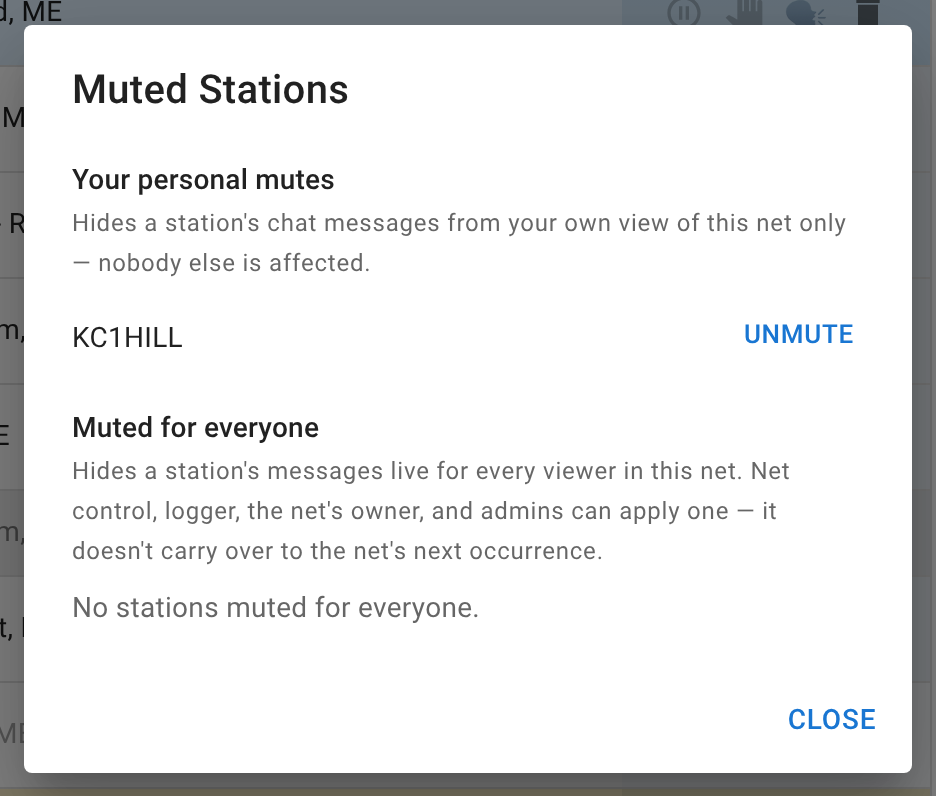
Unmuting from either list is immediate, and for a net-wide mute, every already-open tab updates live — nobody has to reload to see a mute lifted.
Next
Handling traffic and Authenticated nets cover the other two things NCS and Logger can do that a Standard participant can’t.