Coverage drills by site
A routine simplex drill asks who can hear whom. An exercise such as the ARES Simulated Emergency Test asks where: teams go out to shelters, a weather office, and the emergency management offices, and the question is whether each of those places can reach the offices that matter. Next year a different operator will sit in the same shelter, so the result belongs to the place.
Give the net a list of sites and ECTLogger answers that question as reports come in. Each site is checked against the offices you star as primary, the repeaters and nodes each site could get into are kept with a note saying why not, and stations reached outside the net are counted by county.
This builds on station-to-station coverage logging. If you haven’t used that yet, Station coverage explains the reports this page rolls up.
Before you start
You need to be able to edit the net: its manager, its schedule’s manager or a co-manager, or an admin. Sites belong to one net, so for a drill that runs from a recurring schedule, add them to the net that schedule creates, from that net’s Edit.
Set up the sites
- Open the net’s settings (Edit on the net, or the form when creating it) and go to Basic Info.
- Under ARES & EmComm features, turn on Enable Station-to-Station Coverage Logging. The Sites list appears under it.
- Click Add site and type the site as one line: Name, Town, ST, such as
Naples Shelter, Naples, ME, or a name followed by a grid square, such asGray Weather Office FN43rv. The line underneath shows how it was split. If it says no place was found, add a comma before the town. - Pick the site’s Type:
- Official office, for an emergency management office, an EOC, or the weather office.
- Shelter, for anywhere a team deploys to.
- Repeater or node, for a repeater, a packet node, or anything else teams try to get into. See Repeaters and nodes below.
- Click the star beside each office every other site should be able to reach, usually the county and regional offices. These are the primary sites, and the results are measured against them.
- Click Save.
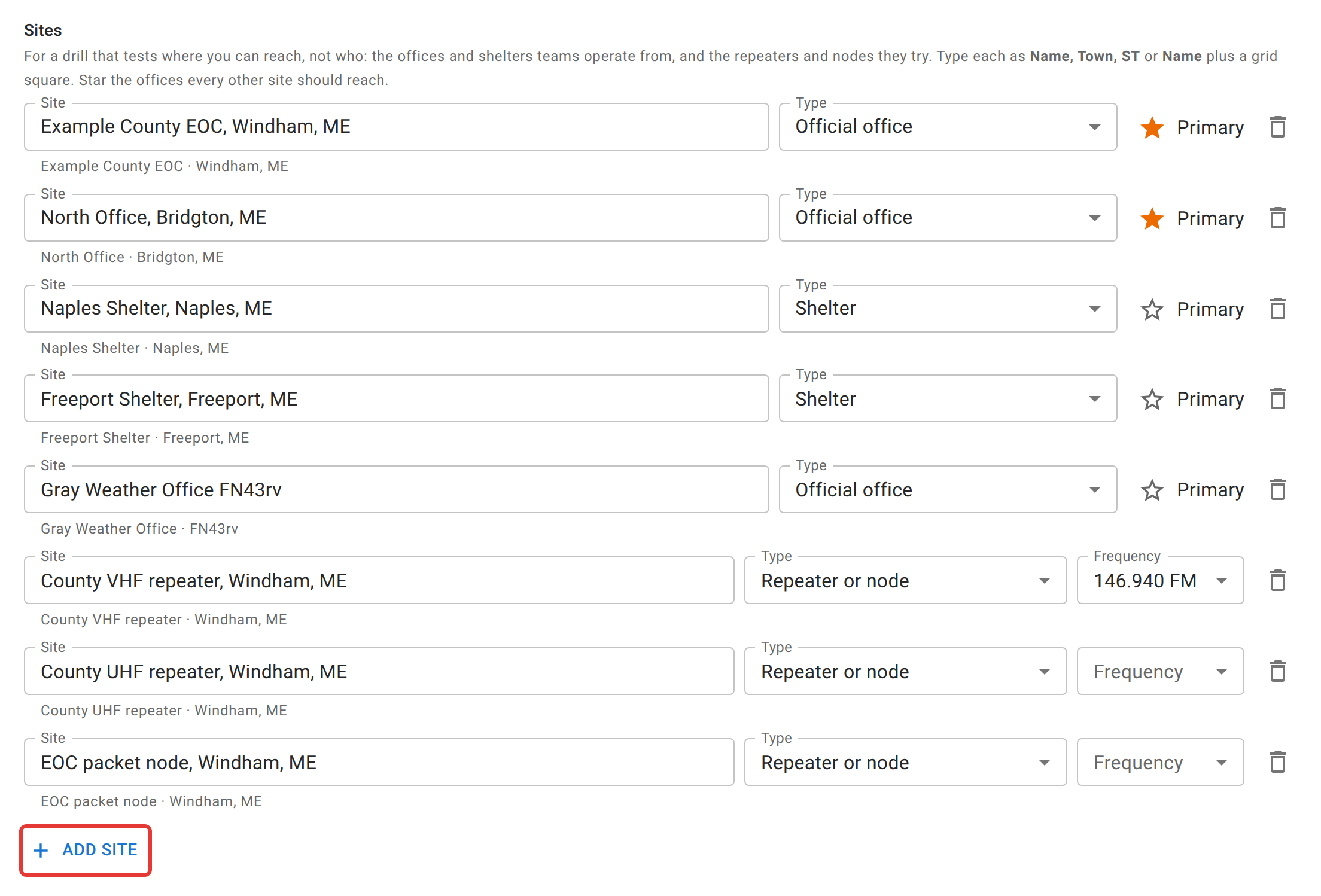
Removing a site takes the stations placed at it off that site; their reports are kept.
Leave repeaters and talkgroups out of the reports
On the Communication Plan tab, a coverage net lists its frequencies under Coverage reports. Untick every repeater and talkgroup. Through a repeater everyone hears everyone, so only direct frequencies say which places can reach each other. An unticked frequency stays on the net for check-ins, chat, and traffic; it just isn’t offered when someone records who they can hear. A schedule has the same list, and the nets it creates inherit it.
Repeaters and nodes
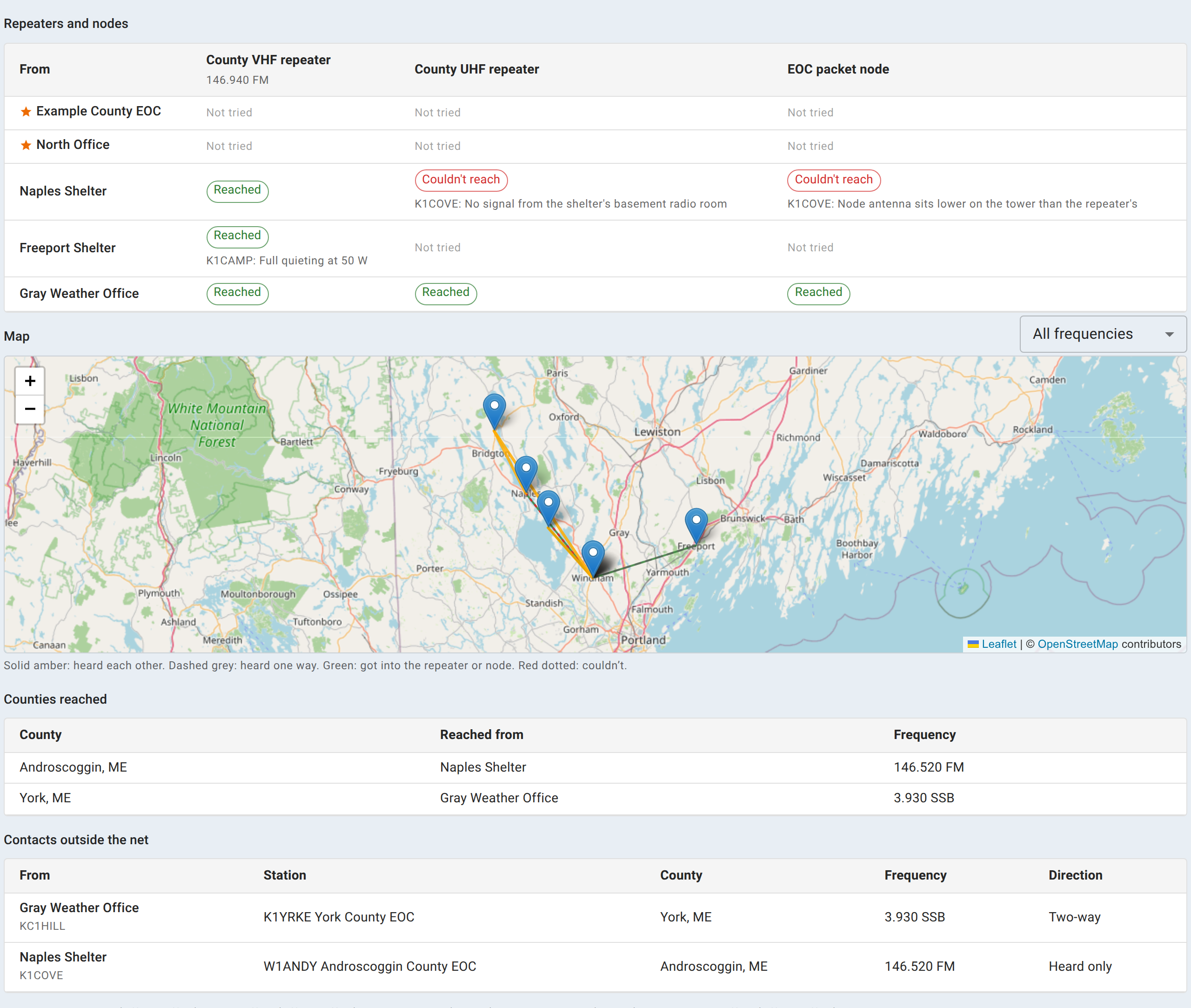
Whether a shelter can get into the county repeater is a different question from whether it can hear another shelter, and the answer is often more useful. A site can reach the EOC on 2m simplex and through the VHF repeater, but not the UHF repeater on the same building, or send Winlink on simplex but not reach the packet node, because the two antennas sit at different heights on the tower.
Add each one as a site of type Repeater or node. Instead of a star it has an optional Frequency, so the results say which repeater was meant. A repeater or node is never somewhere a station operates from, so it isn’t offered at check-in.
During the drill
Checking a station in at a site
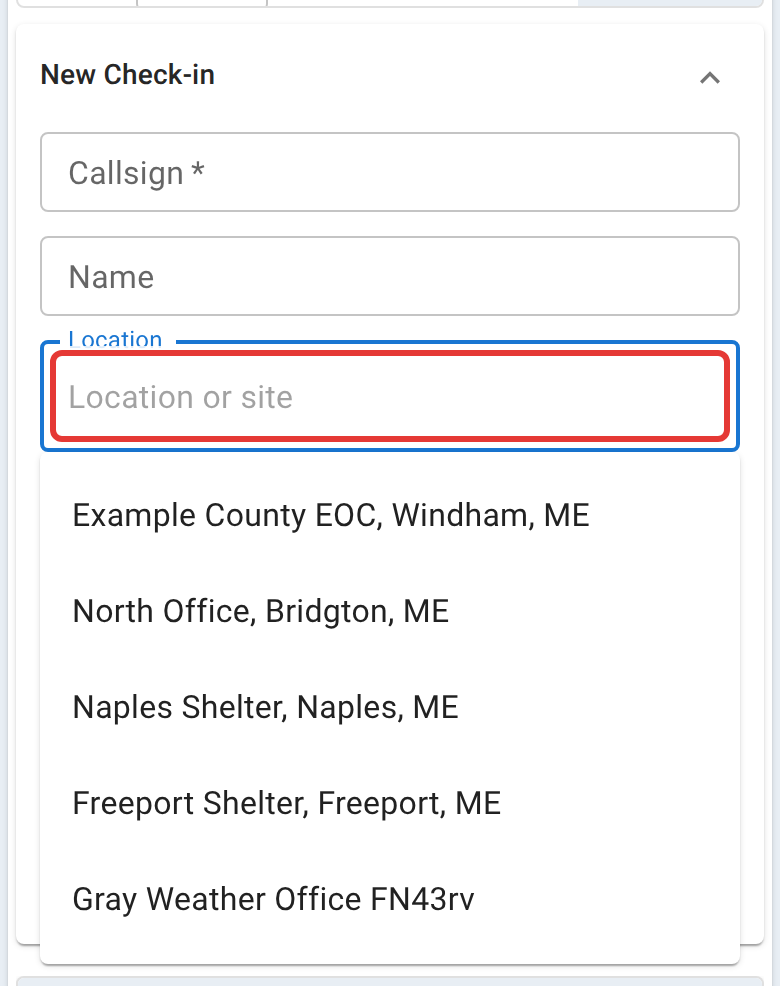
On a net with sites, the check-in form’s Location offers them. Picking one puts the station at that site, and fills in the location so it still lands on the map. Typing anything else is an ordinary location with no site, which is right for a home station that’s relaying.
When a team moves to another site
Check the station out, then check it in again at the new site. Each check-in keeps its own site and its own results, so what the team reached from the first shelter stays with the first shelter. Leave Hide duplicate rows off while the drill runs so both visits stay in view.
Recording what a site reached
Use the ear icon on the station’s row, as on any coverage net. On a drill with sites, the dialog also has:
- Each station’s site under its callsign, so you’re ticking places, not just callsigns.
- Operating Position offering the sites first. It starts at the station’s site.
- Repeaters and nodes: for each one, Reached, Couldn’t reach, or Didn’t try, with an optional note. Write down why a failure happened while it’s fresh; the note is what makes the result useful in the report.
- Outside the net: stations reached that never checked in, such as another county’s EOC. Add the callsign or the agency, its county and state, the frequency, and whether it was Two-way or Heard only. These are what the Counties reached list is built from, so fill in the county.
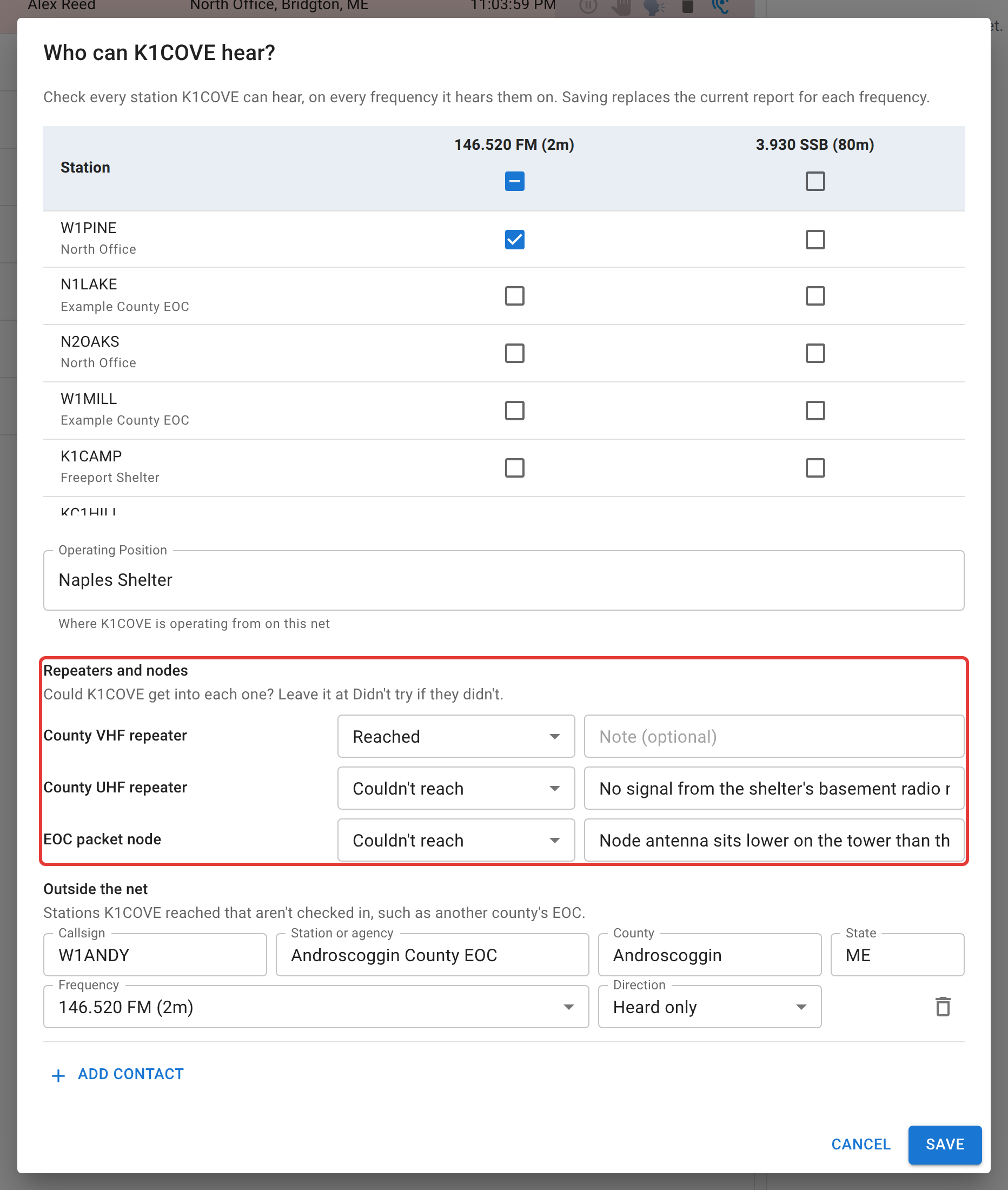
Who can record these is the same as for any coverage report: net control, Logger, and Relay for any station, and each station for its own unless self-reporting is off.
Reading the results
Open Coverage in the toolbar. On a net with sites it opens on By site; Reports switches back to the station-by-station table. It updates live as reports come in, and anyone viewing the net can open it.
Reaching the primary sites checks every site against each starred office:
- Two-way - both places heard each other on one frequency.
- Through a relay - no direct path, but both heard the same third station or site both ways. The station or site that bridges them is named underneath.
- One-way only - only one of the two has heard the other.
- No path - nothing reported either way. Before reading it as a gap, check the site was actually asked.
Between sites is the full grid, with the frequencies each row heard each column on.
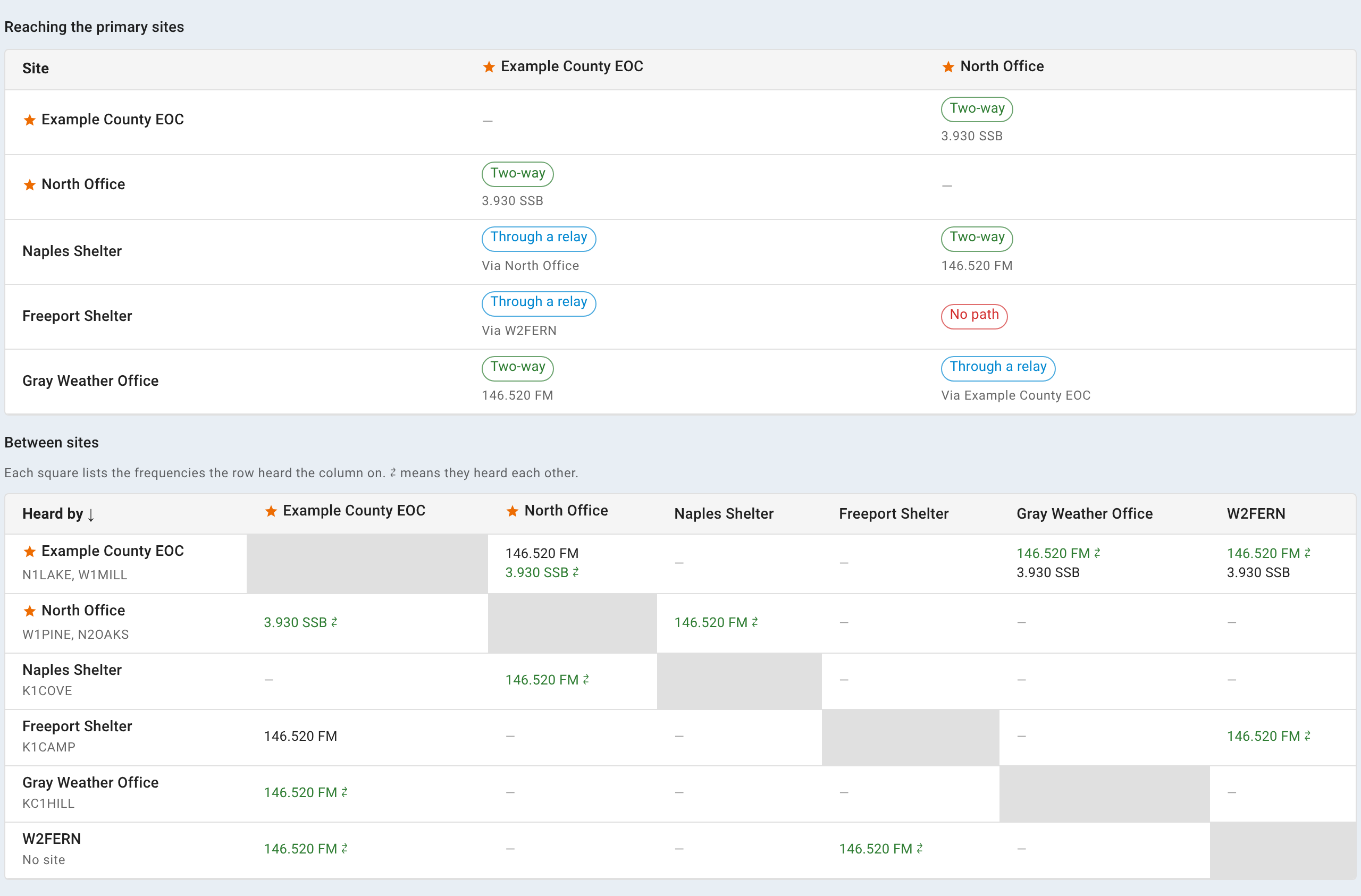
Below those are the Repeaters and nodes results by site, with their notes; a Map of the sites with a line for each path; Counties reached; and Contacts outside the net. A site counts as having reached a repeater if anyone there got in.
Export to CSV downloads whichever view is showing.
After the drill
- The closing email has a Coverage by Site section: reach to the primary sites, repeaters and nodes with their notes, the pairs of sites, counties reached, and outside contacts.
- The net report has the same Coverage by Site section ahead of Station Coverage, in the page and its PDF. See Reports and exports.
- Personal coverage maps are unaffected. A report from a site isn’t a Home report, so it never lands on the operator’s own map.
Settings worth turning on for an exercise
- Enable ICS-309 Communications Log format on Basic Info, so the closing email carries the log in the form served agencies expect.
- Power Src on Check-In Fields, if the exercise asks which sites ran on emergency power.
- Traffic handling, if the exercise moves messages. See the traffic pages in Net control.
- Chat, for observations that fit nowhere else. It’s part of the net’s record.
Related
- Station coverage, for recording reports and reading the station-by-station table.
- Reporting what you hear, the operator’s side.
- Creating a net, for the rest of the net’s settings.