The activity log
The Activity tab in the admin panel answers “who did that?” A net manager writes in asking who deleted their net, a station’s check-in vanished from last night’s log, or somebody keeps coming back under a new account after a ban. Every one of those has an entry here, with who did it, when, what it was done to, and the internet address it came from.
Only admins can see it. Net managers and Net Control can’t, so when one of them asks, the answer comes from you.
What gets recorded
- Sign-ins: every sign-in, every wrong password or two-factor code on a real account, and every attempt by a banned account.
- Accounts: new accounts, profile changes with the old and new value of each field, profile pictures, passwords set or changed, two-factor turned on, replaced, or off, and email changes (both the request and the confirmed change).
- Admin actions on accounts: edits, role changes, bans and unbans, password and two-factor resets, early schedule access, reverted callsign takeovers, deletions, and emails sent to all users.
- Nets: closing, cancelling, restoring, archiving, unarchiving, and deleting, including the ones ECTLogger does by itself (an idle net closed automatically, an old net archived when its schedule’s next one is created). Those show Automatic in the Who column.
- Net and schedule staff: net roles given and removed, Claim NCS, schedule staff and NCS rotation changes, co-manager changes, a schedule handed to a new manager, and merged or deleted schedules.
- Moderation: a check-in deleted, somebody else’s chat message deleted (with what it said), a station muted or unmuted for everyone, a station muted by another participant for themselves, and an off-net log entry deleted. A participant’s own mute shows Another station in the Who column and no address: whom somebody chooses not to read is their business, so it is counted but never named.
- Security alerts: every alert email that went out, for failed sign-ins or a station muted by several people.
- The admin panel itself: site settings, the logo, check-in fields, frequencies and contacts deleted, and every backup setting, key, destination, and download.
Routine net activity is not here. Check-ins and chat are already the net’s own record, in its log.
Find out who did something
- Open the admin panel and choose the Activity tab.
- Type a callsign, a net or schedule name, or any word from the details into the search box. To see one kind of thing, pick it from Show, such as Nets or Sign-ins.
- Read across the row: When, Who, What it was done to, the Details, and From, the address it came from with its approximate location underneath. Hover over an address to see which browser it was.
Anything underlined in a row narrows the list to it. Click a person to see everything they did and everything done to their account, a net or schedule name to see its whole history, or an address to see everything that came from it. Each one shows as a chip above the list; click its × to remove it.
Show activity, the clock icon on each row of the Users tab, opens this tab already narrowed to that account.
Spot one person behind several accounts
Click an address in the From column. Above the list, a box names every account that has used that address, with how many entries each has. When more than one account shares it, the box turns orange.
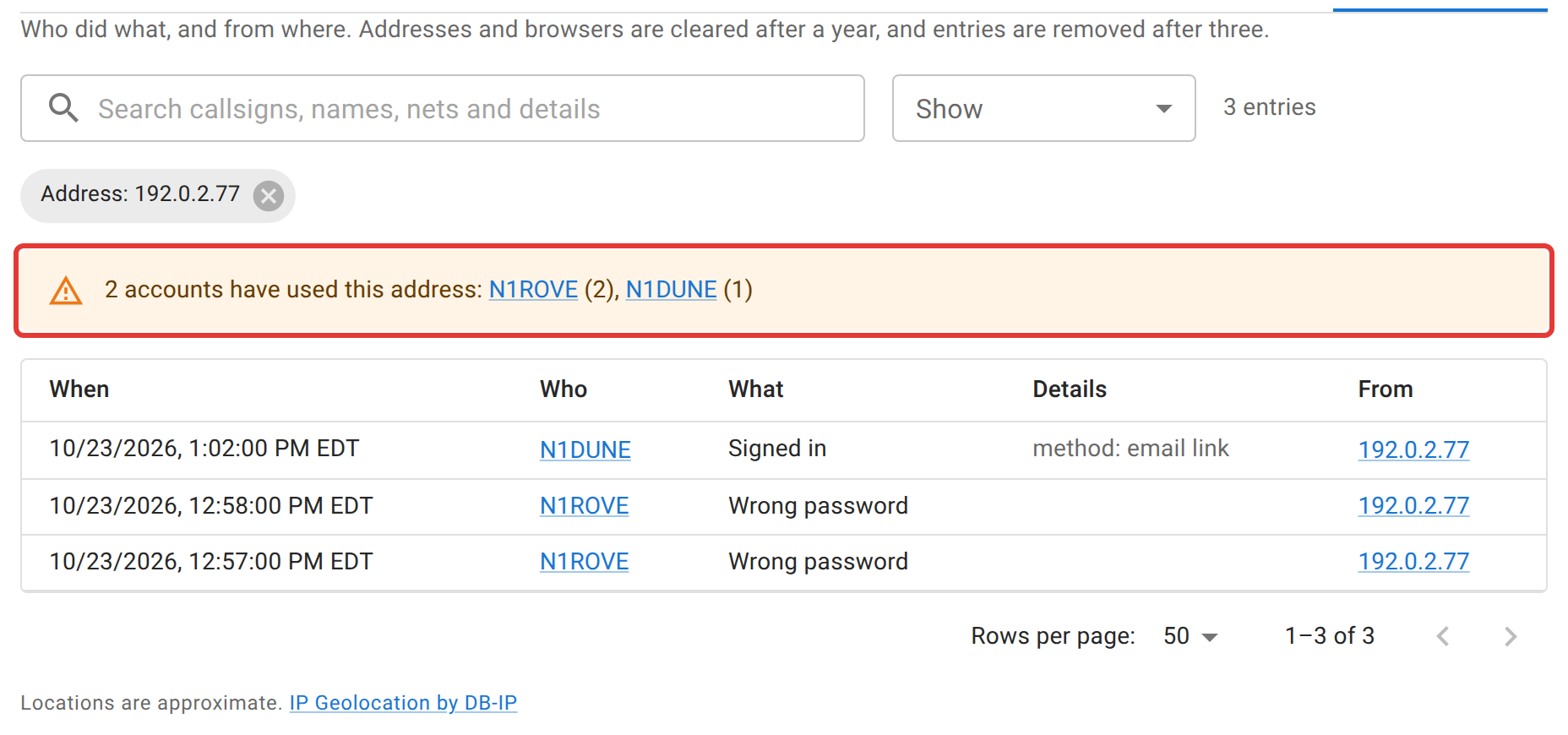
Read it with care. A household, a club station, or a whole mobile carrier’s customers can share one address, so two accounts on the same address is a reason to look closer, not proof.
What surprises people
- A deleted net or account still shows up. The entry keeps the name it had, so “who deleted the Tuesday net” still has an answer after the net is gone. A deleted account shows its last callsign without a link.
- Locations are approximate. They come from DB-IP’s free database, kept on the server, so no address is ever sent anywhere to look it up. A city can be off by a long way, a mobile phone often shows its carrier’s city rather than yours, and a private or unknown address shows none. The credit to DB-IP under the list is required by its license.
- Entries are kept for three years, and addresses for one. After a year, the address, location, and browser are cleared from an entry and the rest stays. After three years the entry itself is removed. These limits are set in the software, not in the admin panel, and the privacy policy tells users about them.
- Account edits from before 23 October 2026 are here too, from the record the Edit User dialog already kept. Nothing else was recorded before that date.
Next
Users and roles covers what to do once you know: banning, resetting, and deleting accounts. Security, MFA, and lockouts covers the sign-in side.